Client:
Platform:
Enterprise EMR Software
Role:
Lead Product Designer
Scope:
End-to-end UX redesign & UI modernization
About MOC
Mumbai Oncology Centre is a specialized cancer care institution focused on delivering comprehensive oncology services through advanced medical technology, multidisciplinary expertise, and patient-centric treatment approaches. The centre provides diagnosis, treatment planning, chemotherapy, and supportive care across multiple cancer types, aiming to combine clinical excellence with compassionate care. With an emphasis on precision medicine and streamlined patient experiences, the organization works to make cancer treatment more accessible, coordinated, and emotionally supportive for patients and their families.
Designing with purpose
Designing for a hospital management platform goes beyond delivering design outputs or building a visual design system — it represents a commitment to the people who rely on it every day. The goal is to simplify workflows across the hospital ecosystem, ultimately supporting better care and positively impacting patients’ lives.
MOC approached us with a clear vision: to design a system that could scale with customized booking behaviors, remain fast and intuitive for front-desk teams, support clinical efficiency for consultants, provide insightful patient summaries, and adapt seamlessly to different hospital personas.
Beyond system-level issues, we needed to understand real hospital operations.
I had the opportunity to visit multiple MOC centers in Mumbai during a three-day field study, which helped me closely observe the day-to-day workflows of various stakeholders — including front office staff, nurses, RMOs, junior and senior consultants, pharmacy teams, insurance departments, billing teams, and account managers across different centers.

Design cannot begin effectively without first building a strong understanding of the existing system and its current challenges. A careful evaluation revealed several key issues:
Feature-rich system with poor usability
Overloaded and cluttered interfaces
Difficult navigation between modules
Inconsistent booking workflows
Complex billing processes for front desk staff
Limited visibility into patient information at a glance
Cognitive overload for clinicians
The primary goal of these interactions was to understand the challenges users faced while working with the existing EMR system, as well as the tasks they were forced to perform outside the system. Gathering insights from multiple personas was initially overwhelming due to the volume and diversity of feedback, but organizing and synthesizing these inputs over the following days helped bring clarity.
During the visit, I also met one of MOC’s founders, Dr. Kshitj, an experienced oncologist who shared a clear vision for how a patient’s clinical profile should be presented within the EMR — something the existing system lacked. He emphasized the importance of a comprehensive historical patient summary and how it could significantly improve clinical decision-making, service quality, and overall patient experience.
This insight became a key direction for the redesign and evolved into one of the core priorities of the project: the Smart Patient Summary.


The design process began with developing the Smart Summary UI, exploring multiple design directions through iterative reviews with consultants. These discussions helped refine the interface to ensure it was both useful and practical in a clinical context. The final design was selected for its ability to present a clear view of a patient’s journey, focusing only on relevant historical data and organizing information in a clean, well-structured hierarchical format without unnecessary visual elements.
Enables Consultants To:
View treatment progression
Understand patient history instantly
Make faster clinical decisions
Value
Transforms fragmented records into a coherent story.

Appointment management was previously a demanding and time-consuming task for front office teams, with heavy reliance on complex calendar interactions. The goal was to minimize effort while making it easier to manage and book patient appointments efficiently.
The proposed design solution streamlined high appointment volumes into a clear, glanceable interface. The appointment card presents essential patient information — including appointment type, time, duration, consultant details, bed allocation, along with intuitive filters and sorting options. This approach reduced operational complexity and enabled faster, more efficient management of patient appointments.
Display maximum patient information without clutter
Maintain readability
Clearly indicate new vs existing patients
Enable powerful filtering
Impact
Front desk can understand daily load instantly.

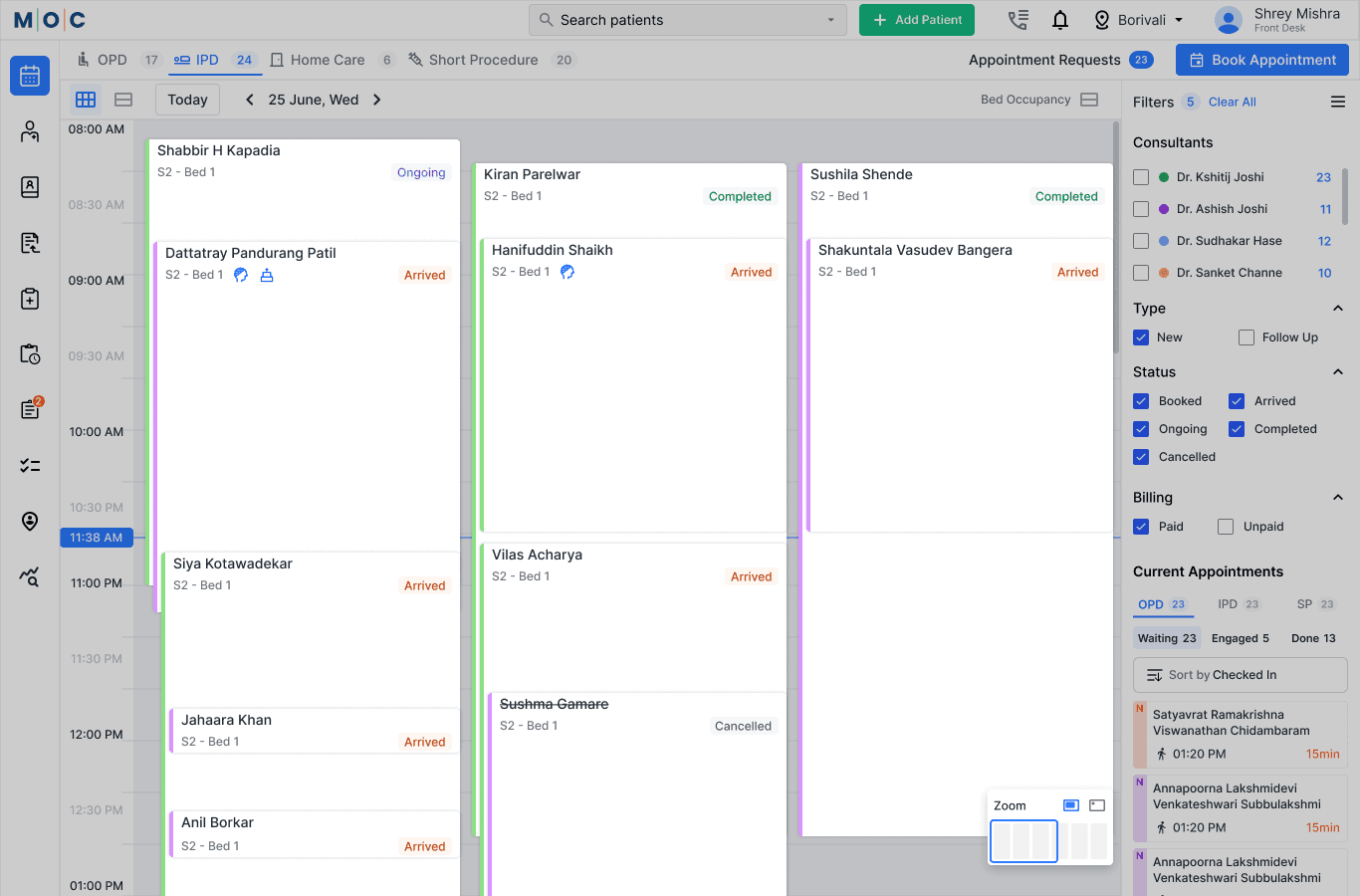
Bed occupancy management was introduced as a key initiative within the IPD workflow to address gaps in the existing system. Previously, there was no clear, centralized overview of bed utilization, treatment room availability, or ongoing schedules, making coordination challenging for operational teams.
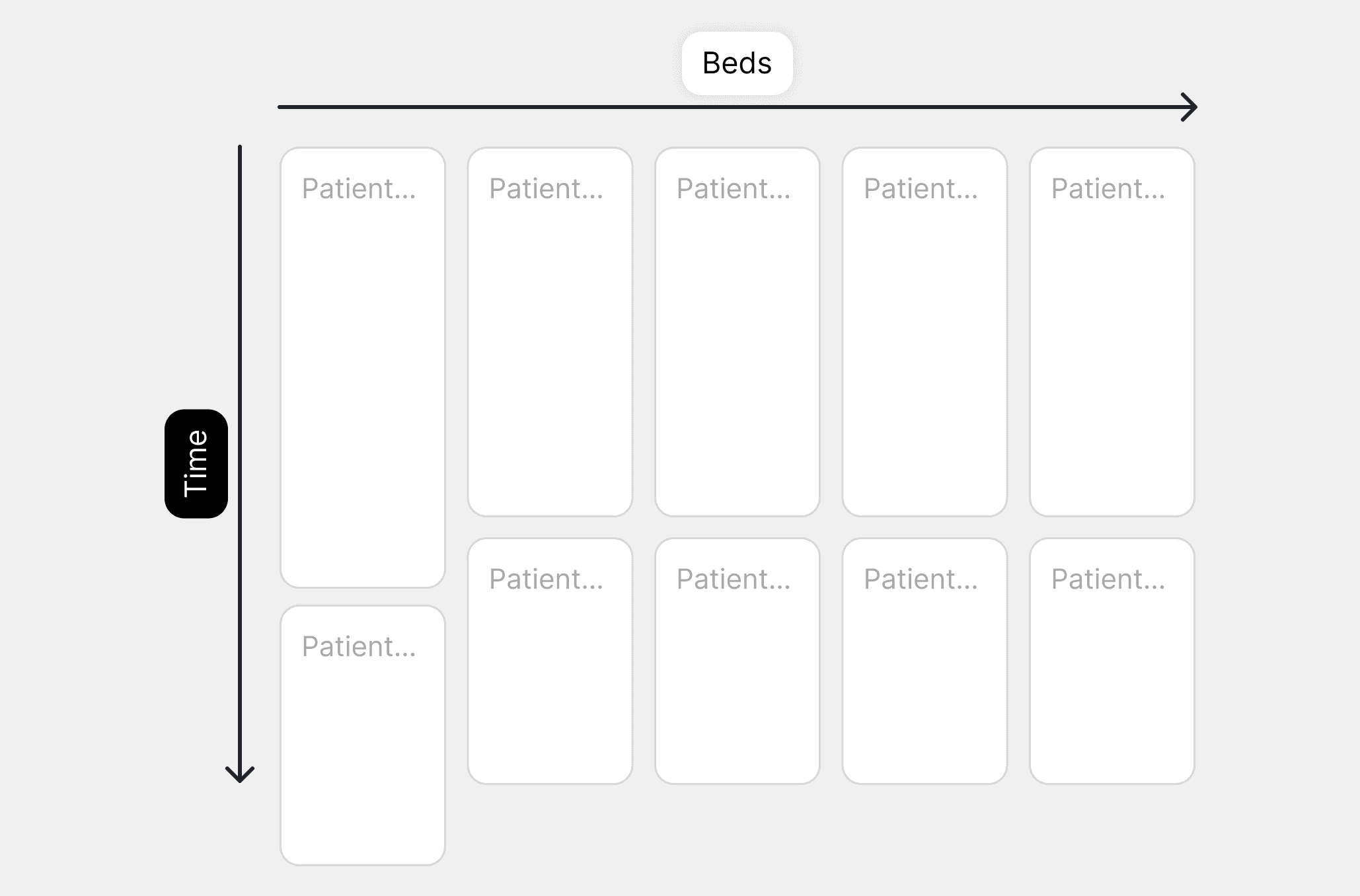
We proposed a unified interface that provides a real-time overview of bed occupancy, clearly displaying which patients are assigned to specific beds and treatment rooms, along with their scheduled treatments. This visibility enables both the front office staff and nursing teams to manage time more accurately and coordinate IPD treatments with greater efficiency.
The system also includes timely reminders when a treatment extends beyond its scheduled duration. These alerts help the front office proactively adjust treatment timelines, reorganize schedules, and prepare for upcoming patients without disruption. By offering better visibility and actionable insights, the solution supports faster decision-making, smoother patient flow, and improved overall operational management within the IPD environment.
What bed layout interface solves:
Bed types
Occupancy status
Special treatments (e.g., scalp cooling)
Patient allocation
Daily overview metrics
Result
Operational visibility improved significantly.
Appointment booking is often a time-consuming and demanding task for front office staff, requiring them to navigate multiple steps and manually enter repetitive information. To address this challenge, we redesigned the booking flow to simplify the process, reduce the number of clicks, and establish a clear visual hierarchy that enables faster and more intuitive interactions.
The new experience minimizes manual effort by automatically populating key patient details for existing patients based on their previous appointment records. This eliminates the need for front office staff to repeatedly fill in the same information during consultations, significantly improving efficiency and reducing the chances of errors.
As part of this redesign, we also introduced a consultant availability feature. This allows staff to instantly view whether a requested consultant is available at a specific time, date, and centre. With real-time visibility into schedules, front office teams can confidently communicate availability to patients, resulting in quicker confirmations, smoother coordination, and an overall improved booking experience for both staff and patients.
Impact
Booking time reduced and errors minimized.
Bed allocation in the existing system was complex and difficult for front-office staff to manage efficiently. To address this, we introduced a streamlined solution that enables quick and accurate bed assignment based on availability and medical requirements.
Proposed Solution
We designed an intuitive bed allocation interface that allows the front office team to easily assign beds by selecting the required duration based on the doctor’s prescription and booking available time slots seamlessly.
Key Improvements
Easy Bed Assignment: Front office staff can allocate beds quickly through a simplified workflow.
Prescription-Based Duration: Bed booking duration can be selected according to the doctor’s prescribed stay.
Availability-Driven Booking: Slots can be reserved based on real-time bed availability.
Clear Occupancy Visibility: The interface clearly displays which beds are already occupied.
Insufficient Slot Indicators: Beds with limited or unavailable time slots are visually highlighted for faster decision-making.
Intuitive Interface: Designed for quick understanding, reducing errors and operational effort.
Impact
Booking time reduced and errors minimized.
The consultant directory in the existing EMR was underutilized, as front office staff could view consultant availability only through an interface that required multiple clicks to access detailed information — such as the MOC centre, consulting hours, and duration.
Our design approach addressed this by enabling instant visibility of consultant availability across multiple centres, days, and time slots. The interface was made easily discoverable within the appointment booking flow, allowing staff to access relevant information at the right moment. The solution delivers a flexible experience that supports multiple navigation paths while simplifying the booking process.
Problems Solved
Consultant visibility unclear
Hard to know availability
Solution
Department-based directory
Multi-location consulting visibility
Availability indicators
Direct booking entry
Most importantly, several key modules are primarily managed by RMOs, supported by the Smart Summary. These include Clinical Summary, Consultant Notes, Clinical Profile, Current Admission, and Other Specialties.
These modules serve as the core clinical workspace for RMOs, nurses, and consultants across all MOC centres. RMOs use them to capture and maintain patient information during visits, including the patient’s current condition, vitals, test reports, prescriptions, consultant recommendations, and next-visit details.
Nurses access these clinical modules during IPD stays or treatment phases, where they create chemotherapy protocols and administer medications based on the consultant’s prescriptions.
Issues with existing system
Confusing structure
Hard-to-find submodules
Poor navigation
New Approach
Re-architected clinical structure with:
Logical grouping
Persistent navigation
Faster access paths

Create a single starting interface for patient visits.
Supported Visits
OPD
IPD
Homecare
Short Procedures
Key Information at a Glance
Booking details
Patient summary access
Billing shortcut
Treatment status
Outcome
Reduced navigation friction during patient handling.
Challenges
Front desk struggled with billing complexity.
Design Solutions
Clear invoice workflows
Reduced pages and clicks
Simplified bill management
Modular billing components
Scalable for accounts team workflows
MOC was more than just another project for me. Working alongside multiple stakeholders — developers, tech leaders, product owners, and QA teams — became a continuous learning experience that shaped how I approached designing better solutions for a new healthcare experience.
Beyond building the system itself, one of the most important contributions I could bring was care — not only in the design decisions but also in how the service supports the people it serves. As a healthcare product, the focus extended to improving patient experience, reducing treatment delays, and ultimately helping save and care for more lives.
Another key vision from MOC was to make print outputs highly compact while minimizing paper usage. This pushed us toward creating minimal, efficient, and thoughtfully structured print designs that balanced usability with sustainability.